Alt+S opens it ·
Alt+C re-copies your last snippet
No access to your browsingLocal-first storageNo account required
The hunt
You already have the words. Finding them is the job.
The sentence you need exists. It is in a thread from March, or a
doc, or the last ticket you closed. So you go and get it — again.
Without yDirect
01 Open a new tab, break your train of thought
02 Search a thread, a doc, a note app, a ticket
03 Scroll past four near-misses
04 Select carefully, copy, hope you got the whole thing
05 Find your way back to where you were
With yDirect
01 Press Alt+S — the panel opens beside your work
02 Click the snippet. It is on your clipboard.
Reusing the same one? Alt+C re-copies your last
snippet without opening anything at all. That is zero clicks.
What it does
Small enough to stay out of the way. Complete enough to rely on.
Two clicks, or fewer
One click on a snippet puts it on your clipboard — that is the
whole interaction. Alt+S opens the panel from anywhere, and Alt+C
re-copies the snippet you used last without opening anything at
all. yDirect counts every copy, so the things you actually reach
for rise to the top.
one-click copy
Alt+S
Alt+C
copy counts
Fast organization
Folder and List views, search across everything as you type,
sorting, timestamps, and masked values for anything you would
rather not have readable over your shoulder.
folder view
list view
search
sorting
masked values
Right-edge workspace
Open it from the Chrome toolbar, the keyboard shortcut, or the
optional floating shortcut on a supported page. It opens in
Chrome's own side panel beside your work — never injected into
the page you are reading.
native side panel
toolbar
floating shortcut
Reliable portability
Lossless JSON and Excel exports, plus passphrase-encrypted JSON
for anything sensitive going offline. Cloud backup runs manually
or on a daily, weekly or monthly schedule — and empty data never
overwrites a valid backup.
JSON
encrypted JSON
Excel
scheduled backup
Controlled sharing
Share selected folders or snippets with verified yDirect accounts.
Super Admins own the workspace,
Core Members organize content and manage sharing,
and Members see only what was shared with them.
Access is checked on the server, not hidden in the interface.
verified accounts
3 roles
server-enforced
How it works
Three steps, and you never do step one again.
Save it once
Paste in the text you keep retyping, give it a name, drop it in a
folder. That is the whole setup.
Open the panel
Click the toolbar icon or press the shortcut. yDirect opens in
Chrome's own side panel, beside your work — never injected into
the page you are on.
Alt+S
Click to copy
One click and it is on your clipboard. Reusing the same snippet
all day? The shortcut re-copies it without opening anything.
Alt+C
What it can and cannot see
A snippet manager should not need to watch you browse.
yDirect asks for the narrowest permissions that let it do its job,
and is direct about the ones it does use.
No access to every site
yDirect holds no standing permission for the websites you visit.
It gets temporary access to the current tab only after you invoke
it, and its only network destination is yDirect's own backend.
No browsing history, no page contents
It does not collect the pages you open, what is on them, your
keystrokes, advertising identifiers, or your location. Nothing is
sold, and snippet content is never used for advertising.
Local first, cloud only if you ask
Your working copy sits in Chrome's storage on your machine. Cloud
backup and shared workspaces are opt-in: they do nothing until you
sign in and turn them on.
Your data leaves whenever you want
Export everything to JSON, passphrase-encrypted JSON or Excel at
any time. Delete your account from settings and your cloud data,
owned workspaces and backups go with it.
yDirect is not a password manager.
Please do not store passwords, payment card data, private
keys, recovery codes, government identifiers or regulated
records in it. Masking hides a value on screen to stop
someone reading over your shoulder — it is not encryption, and it is
not a substitute for a purpose-built credential vault. yDirect is
for the ordinary text you reuse: replies, sign-offs, addresses,
boilerplate, references.
In the browser
Docked to the edge, beside whatever you are doing.
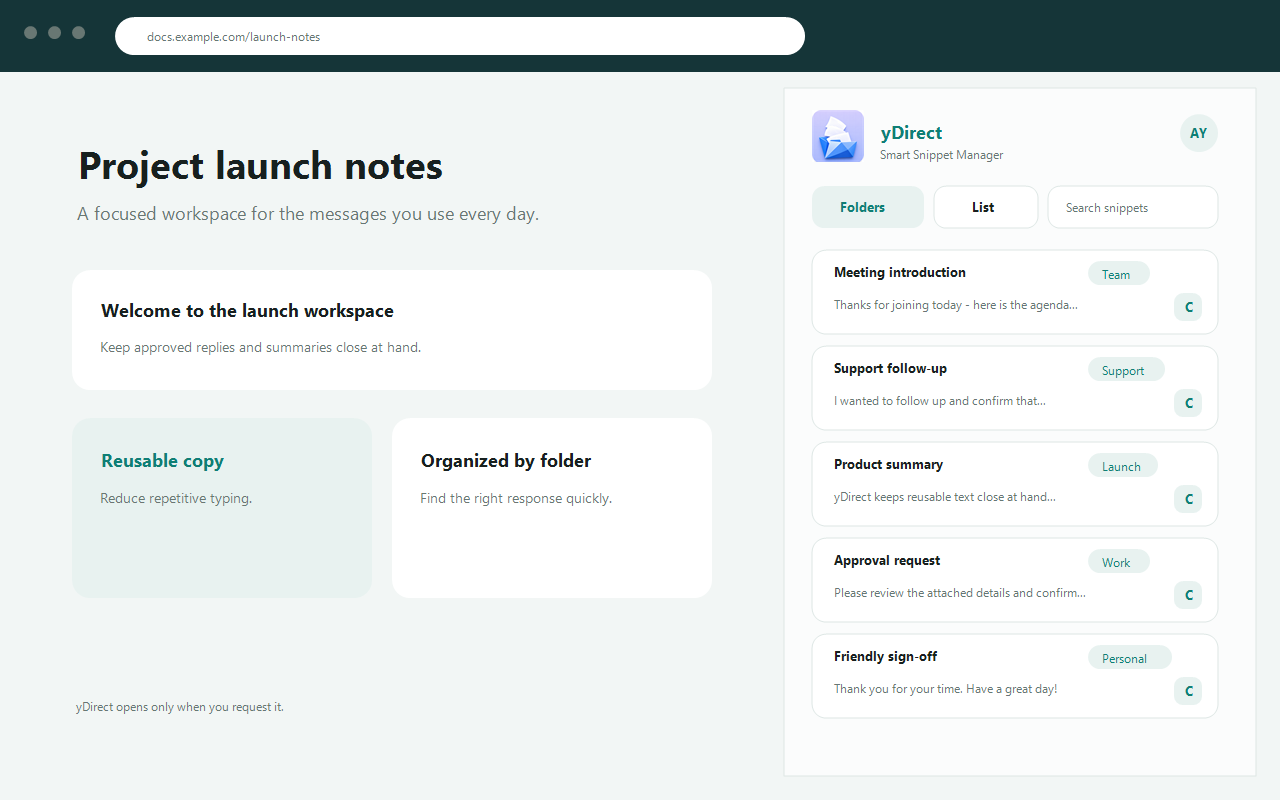
The panel open beside a page, with sample snippets.folder view
Before you install
The questions worth asking.
Can yDirect read the pages I visit?
No. yDirect does not request access to every website — it holds
no standing permission for any site you browse, and does not
collect browsing history, page contents or keystrokes.
It uses Chrome's activeTab permission,
which grants temporary access to the current tab only after you
click yDirect or press its shortcut. The only server it talks to
is yDirect's own backend, and only for account, backup, sharing
and feedback requests you initiate.
Is this a password manager?
No, and it should not be used as one. Do not store passwords,
payment card data, private keys, recovery codes, government
identifiers or regulated records in yDirect.
Masking blurs a value on screen so someone nearby cannot read
it. That is a shoulder-surfing measure, not encryption.
Credentials belong in a purpose-built vault.
Where is my data actually stored?
Locally, first. Your active snippets live in Chrome extension
storage on your own machine, with account-separated local
profiles.
Optional cloud backup stores two recovery points — your latest
backup and the one immediately before it — in yDirect's Firebase
project. Shared workspace content is stored there too, so
authorised accounts can reach it. Both are off until you sign in
and enable them.
Do I need an account?
Not for the core job. Saving, organising, searching and copying
snippets all work without one.
An account — email or Google sign-in — is only required for the
optional pieces: cloud backup, and verified-account workspaces
with role-based sharing.
Can I get my snippets back out?
Any time. Export to JSON, passphrase-encrypted JSON, or Excel,
and import the same formats back in.
One caution: an unencrypted export exposes every snippet it
contains to anyone who gets the file. Use the encrypted option
if the export is going anywhere but your own machine.
What does it cost?
Nothing. Version 1.3.3 is free, with no subscriptions, no
payments and no paid tiers. If a paid feature is ever
introduced, its price and terms will be shown before any
purchase — using this release creates no payment obligation.
Stop going to find it.
Install yDirect, save the five things you retype most, and get the
rest of the week back.